Castle Solitaire: Card Game
- 4.7
- Rating
- 1.00M
- Installs
- Free
- Price
 Analysis by App-foxy
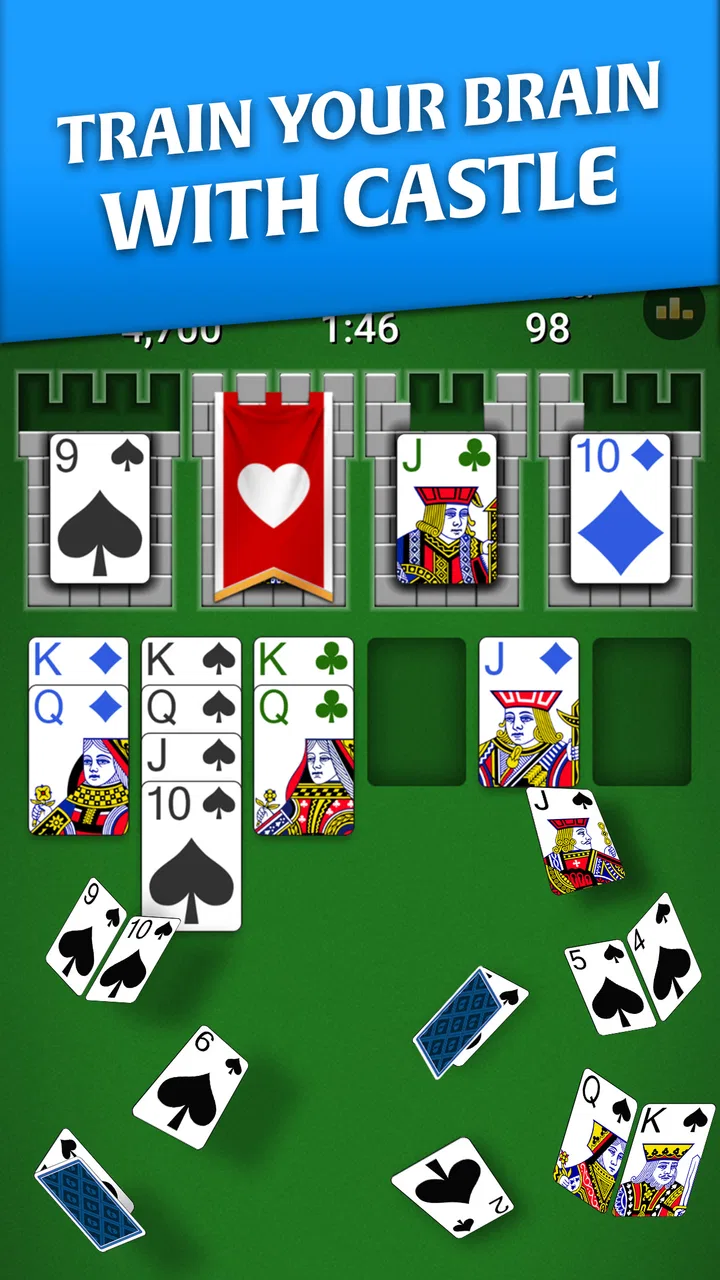
I approached Castle Solitaire: Card Game as a quick-play card game rather than something meant to replace a full evening of entertainment. Its central idea is easy to understand: you play solitaire while gradually building a castle. That theme gives the familiar card format a little more personality, but the real appeal is how naturally it fits into short breaks. I can imagine opening it while waiting for an appointment, winding down before bed, or taking a few quiet minutes away from a busier game.
MobilityWare developed this free card game for everyone, and it is available for Android devices running version 8.0 or later. The game has reached over a million installs, with a 4.7 average from around 101,000 ratings. Those figures suggest that the basic formula works for a broad audience, although popularity does not remove the small points of friction that can appear during setup or regular play.
Getting started without unnecessary frustration
The first thing I would check is compatibility. Castle Solitaire requires Android 8.0 or newer, so an older phone or tablet may be the first reason it cannot be installed or updated. This is a simple check, but it saves time: if the operating system is below that requirement, reinstalling the game or clearing storage will not solve the underlying problem.
You May Also Like

 Blood Strike: 2.5 Anniversary
Blood Strike’s Loadouts Turn Every Drop Into a Tactical Gamble
A close look at Blood Strike’s custom loadouts: how fast access to signature weapons reshapes its battle royale rhythm, rewards preparation, and narrows the gap between fights.

 Pandora - Music & Podcasts
Pandora’s Music Is Easy to Start, but Harder to Recover
Pandora’s strength is its low-effort path from a seed to a station. Its weak spot is how much confidence it asks you to place in connection, setup, and quiet recovery.

 8 Ball Pool
 Is Built on Rivalries, Rematches, and Routine
A close look at the rivalries, rematches, shared routines, and unanswered safety questions that turn a quick pool match into a persistent mobile community.

 Samsung Music
’s Quiet Strength Is Playing What You Already Own
Its reach comes less from spectacle than from dependable access to a personal library. That simplicity is both the app’s strongest retention engine and its ceiling.

 AccuWeather: Weather Radar
AccuWeather Review: A Quick, Clear Forecast for Everyday Decisions
For everyday plans, the best forecast is the one you can understand quickly. AccuWeather makes rain timing, radar, and local conditions easy to act on, with a few trade-offs.

 Hill Climb Racing
Why Hill Climb Racing Still Turns Crashes Into One More Run
A tiny car, a bumpy hill and one more upgrade: Hill Climb Racing keeps resurfacing because its simple chaos makes every near-miss feel personal.
More From Our News Desk



On a supported device, I would make sure there is enough free space and that the connection is stable before downloading. A weak connection can make an installation seem frozen even when the issue is outside the game itself. If the download pauses, I would first retry on a reliable network, then restart the device only if the store continues to behave strangely. These are ordinary steps, but they are more useful than repeatedly tapping the install button.
The game is free to download, which makes it easy to try without committing money upfront. It does include optional in-app purchases, with individual items ranging from $1.99 to $29.99. I see that as an important practical detail for anyone sharing a device with children or anyone who prefers a completely purchase-free experience. I would review the device’s purchase controls before handing it over, rather than treating the free label as a guarantee that every part of the experience is cost-free.
Once installed, I would give the game a moment to load instead of immediately assuming that a slow first launch means it is broken. Closing other demanding apps can also help on an older device. If the game opens and then closes repeatedly, I would check for a pending system update, relaunch it after freeing some storage, and only then consider reinstalling. Reinstalling should be a later step because it can remove local progress or settings, depending on how the device handles the app.
The first session is simple, but the theme changes the feel
The card play itself follows the recognizable rhythm of solitaire: examine the layout, make legal moves, reveal useful cards, and avoid blocking the options you may need later. The castle-building presentation gives those decisions a visible sense of progress. I found that this makes the game feel less like repeatedly clearing an anonymous card arrangement and more like working through a small personal project.
That does not mean the theme transforms solitaire into a deep strategy game. The underlying attraction remains the same as other solitaire apps: a calm pace, familiar rules, and the satisfaction of finding a route through a layout. Players who already enjoy classic solitaire will understand the appeal immediately. Players looking for rapid action, multiplayer competition, or a large role-playing system may find the castle idea too light.
My practical advice is to treat each round as a short decision exercise. Instead of moving the first available card automatically, I would pause long enough to consider which move exposes another card and which move merely rearranges the visible area. That habit matters more than speed. It also helps prevent the common feeling that a round became impossible because of one careless early move.
Where players are most likely to get stuck
The most common difficulty is not installation; it is understanding why a seemingly useful move is actually harmful. Solitaire rewards planning several actions ahead, and the castle theme can make the screen feel more relaxed than the decisions really are. A move that clears one space may also hide the card needed to continue another sequence. When I reach that point, I look for moves that reveal something new before making moves that only tidy the current layout.
Another point of friction is expecting every round to be solved by playing quickly. Some layouts require patience and a willingness to leave a card where it is until a better route appears. If I keep repeating the same sequence and reach the same dead end, I stop treating it as a reflex game. I scan the available columns again and ask whether I am preserving enough flexibility for the next few turns.
The castle presentation may also lead new players to expect a large construction or customization system. I would approach it more modestly: the castle is the game’s motivating wrapper around solitaire, not a substitute for a dedicated building game. That distinction helps set the right expectations before downloading.
Recovering a stalled round or awkward session
If a round feels stuck, I would first review the board rather than immediately closing the app. Check whether a move has been overlooked, especially one that reveals a face-down card or opens a needed space. In solitaire, the best move is not always the most visually obvious one, and restarting too quickly can hide the fact that the issue was simply a missed option.
If the interface itself stops responding, I would close and reopen the game. If that fails, restarting the device is a sensible next step. I would avoid clearing app data unless I was prepared for the possibility of losing local progress. Clearing a cache can sometimes help with temporary loading trouble, but it should not be confused with clearing all stored data; those actions can have very different consequences.
After an update, I would also check whether the problem affects only one round or the whole game. A single difficult layout is a gameplay situation. A screen that remains blank, controls that do not react anywhere, or repeated crashes point more toward a technical problem. Separating those cases prevents unnecessary changes to the device.
When a purchase does not appear immediately, I would avoid buying the same item again. First, I would confirm that the device is using the intended store account and then reopen the game after checking the connection. If the transaction still does not appear, the sensible route is to use the store’s purchase support process and keep the receipt. Repeated tapping can turn a delay into an accidental duplicate purchase.
When the game is not the actual cause
Not every failure that appears while playing originates in Castle Solitaire. A device with very little free storage can behave unpredictably across many apps. An unstable Wi-Fi connection can interrupt loading or make a store operation look incomplete. Background restrictions, a pending operating-system update, or a general device slowdown can also create symptoms that seem specific to the game.
I would test the situation carefully. If other apps are also slow, crashing, or failing to download, I would focus on the phone or tablet first. If only this game has trouble while everything else works normally, then closing it, checking for an available update, and reinstalling become more reasonable steps. This process is less dramatic than immediately blaming the app, but it usually leads to a clearer answer.
There is also a difference between a limitation and a fault. A player who wants a large competitive community may feel disappointed because a quiet solitaire experience does not provide the same energy as a multiplayer card title. That is not a malfunction. Likewise, someone who dislikes optional purchases may reasonably prefer a paid, purchase-free alternative, even though the free download makes this game easier to sample.
How it compares with familiar solitaire alternatives
Compared with a plain solitaire utility, this game has a stronger sense of identity. The castle gives me a reason to keep going beyond simply clearing a deck, and it makes the experience feel more inviting for people who find a bare card table dull. The trade-off is that players who want the most stripped-down interface may prefer a traditional solitaire app with fewer visual ideas around the cards.
Compared with a larger card-game collection, Castle Solitaire is more focused. I would choose it when I already know I want solitaire and do not need several unrelated games in the same download. A collection may offer more variety, but that variety can also make the experience feel less direct. Here, the theme and the card format point in the same direction.
Compared with a paid solitaire game, the free entry is an advantage for casual users who want to test the style first. The presence of optional purchases means a buyer who values a single upfront payment should think about that trade-off before settling in. For me, the right choice depends on priorities: easy access and a themed presentation favor this game, while strict simplicity or a purchase-free environment may favor another option.
Useful habits for everyday play
I would use the game in defined sessions rather than opening it whenever I am trying to avoid a task. A short round during a commute or a waiting period is a good fit because the card decisions are understandable without demanding a long story or complicated setup. If I were playing before sleep, I would keep the screen brightness comfortable and stop when the game began to feel repetitive rather than treating one more round as a requirement.
For better decisions, I would prioritize moves that uncover information. Revealing a hidden card can change the entire board, while moving an already visible card may only create temporary order. I would also avoid using every available space immediately. Keeping room for later rearrangement is one of the small strategic habits that separates a thoughtful round from a sequence of automatic taps.
When a round goes badly, I would use it as a review of choices instead of assuming the layout was unfair. Ask which move first reduced the available options, then try a different order next time. This makes the game more satisfying for me because progress comes from improving judgment, not only from waiting for an easy arrangement.
Families should also decide in advance whether optional purchases are acceptable. The Everyone age rating makes the game broadly approachable, but age suitability and spending suitability are separate questions. A child can understand the card play while still needing the device owner to manage purchases. A quick settings check before sharing the phone is more practical than trying to correct an unexpected transaction later.
Who should choose it, and who should skip it
I would recommend Castle Solitaire to someone who enjoys classic card puzzles but wants a warmer presentation than a plain deck on a blank background. It suits players who prefer solo play, short sessions, and decisions that are easy to learn but still reward attention. It is also a sensible first try for someone who has not played much solitaire and wants a free starting point from an established developer, MobilityWare.
I would be less likely to recommend it to a player seeking competitive matches, social interaction, fast reactions, or extensive construction mechanics. The castle theme adds motivation, but it does not turn the game into a full strategy or building title. I would also point a user toward a different alternative if avoiding optional purchases is a firm requirement or if the device cannot run Android 8.0 or later.
The current version is 2.3.0.1836, so checking that the installed copy is up to date is sensible when troubleshooting. Updates can resolve general compatibility problems, but I would still use the same careful process: confirm the device version, check storage and connection, restart the app, and protect local progress before reinstalling.
My practical verdict
After spending time with it, I see Castle Solitaire as a polished casual card game whose strongest quality is focus. It takes a familiar solitaire loop and gives it enough castle-themed direction to feel more purposeful without burying the cards under complicated systems. The free download lowers the barrier to trying it, while the optional purchase range is worth remembering for anyone managing a shared device or a strict budget.
The game works best when I want a quiet, self-contained activity with a little visual progress. Its weaknesses are equally clear: the theme may feel too light for players expecting a genuine building game, and the free-to-play structure may not suit people who want a completely purchase-free experience. Technical trouble should also be diagnosed methodically instead of automatically blamed on the game.
My recommendation is straightforward: download it if you want accessible solo solitaire with a castle setting and room for small strategic decisions. Start by checking compatibility, keep expectations centered on card play, and use the recovery steps above if a session stalls. If what you really want is multiplayer competition, a deep construction system, or a single-payment alternative, this is probably not the best match. For relaxed everyday card sessions, though, it earns its place on my device.
FAQs for Castle Solitaire: Card Game
01What is Castle Solitaire: Card Game and how does it differ from other solitaire games?
Castle Solitaire: Card Game is a unique twist on the classic solitaire genre. Unlike traditional solitaire, it involves building card sequences in a castle-themed setting. The objective is to clear all cards from the board by stacking them in sequence. Its engaging design and strategic gameplay set it apart from other solitaire variations.
02Is Castle Solitaire suitable for beginners or only for experienced players?
Castle Solitaire is designed to be accessible for both beginners and experienced players. It offers intuitive controls and an easy-to-follow tutorial to help newcomers. For seasoned players, it presents challenging levels that require strategic thinking and planning, ensuring an enjoyable experience for all skill levels.
03Does the game require an internet connection to play?
Castle Solitaire can be played offline, making it a perfect choice for users who want to enjoy the game without an internet connection. However, some features, like in-game purchases or leaderboard updates, may require online access. This flexibility allows players to enjoy uninterrupted gameplay wherever they are.
04Are there any in-app purchases in Castle Solitaire?
Yes, Castle Solitaire includes in-app purchases. Players can buy additional features, such as hints or extra moves, to enhance their gaming experience. While these purchases can provide advantages, they are optional, and players can still enjoy the full game without spending money.
05What are the system requirements for installing Castle Solitaire on my device?
For Android users, Castle Solitaire requires Android 4.4 and up. For iOS users, it requires iOS 9.0 or later. It's optimized for both smartphones and tablets, ensuring smooth gameplay across devices. Ensuring your device meets these requirements will provide the best experience.
Pros
- Simple and intuitive gameplay.
- Challenging levels for strategy lovers.
- Offline mode available.
- Minimal ads for a free app.
- Pleasant and calming graphics.
Cons
- Limited customization options.
- Occasional repetitive gameplay.
- In-app purchases can be pricey.
- No multiplayer mode available.
- Lacks daily challenges.

Castle Solitaire: Card Game
Gallery